
Jamzone - Sing & Play Along
RecisioMusic & Audio
4.7477.00 Reviews
- Version
- 3.6.4
- Installs
- 100.00K
- Age Rating
- Everyone
Screenshots
Our Review of Jamzone - Sing & Play Along
 Analysis by Appyee
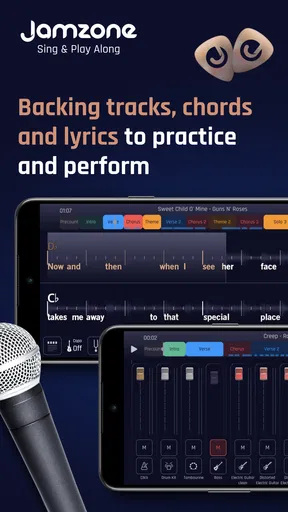
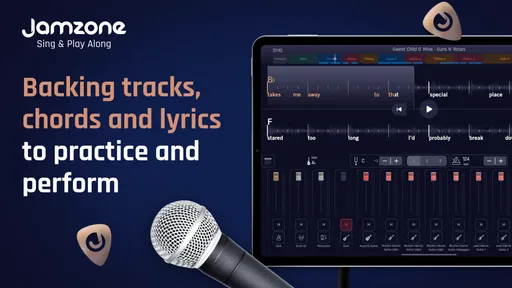
When I use a music app to sing or practise, the small details matter: can I find a song without wrestling with menus, and can I shape the sound so it suits what I’m trying to do? Jamzone - Sing & Play Along is built around that kind of hands-on music making. It is a music and audio app from Recisio, with backing tracks, chords and lyrics at its core. I see its clearest appeal in the way it lets a singer or player work with a song rather than simply listen to it.
Finding your way around the music
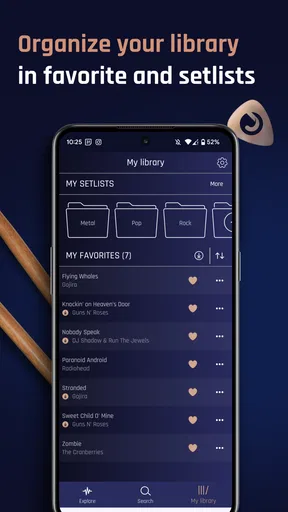
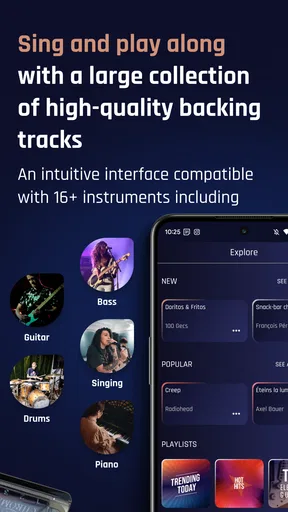
The first useful question is not how many features an app has, but whether you can get from opening it to practising without losing your place. Jamzone’s search and playlist browsing give you two different routes: look for a particular song when you already know what you want, or browse when you are still choosing. That distinction makes it easier to use for both a planned practice session and a casual sing-along.
In the published review, I found the interface straightforward to navigate. That matters especially when you are switching between a song and its controls: a complicated layout can interrupt the musical moment. The practical approach is to choose a track first, then adjust its parts and playback to suit your session, rather than trying to configure everything before you know what you want to play.
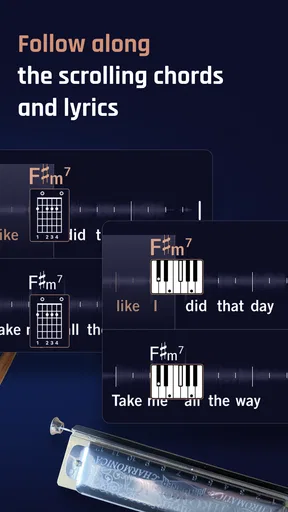
As a catalogue app, it also differs from a typical music-streaming player. A streaming service is usually best when the goal is to hear finished recordings; Jamzone is more useful when you want to take an active part. Its backing-track approach can make a familiar song feel like practice material, while chords and lyrics give singers and instrumentalists a way to follow along. If your main need is discovering new albums or building passive listening playlists, a conventional streaming app may be a better fit.
Making the controls work for different players
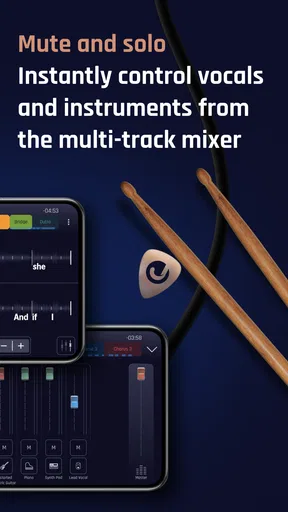
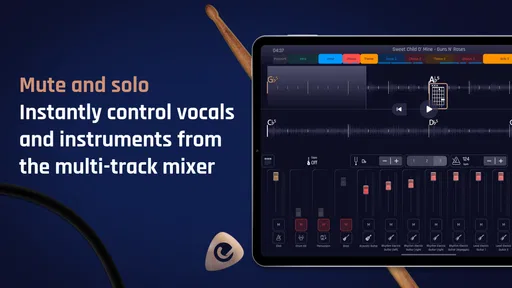
The strongest practical idea here is the ability to mute or unmute individual instruments. Instead of trying to play over a fully busy arrangement, you can make room for your own part. For example, a guitarist can lower or remove the guitar part and listen for the rhythm section, while a singer can focus on the vocal line without every layer competing for attention. This turns one backing track into several practice situations.
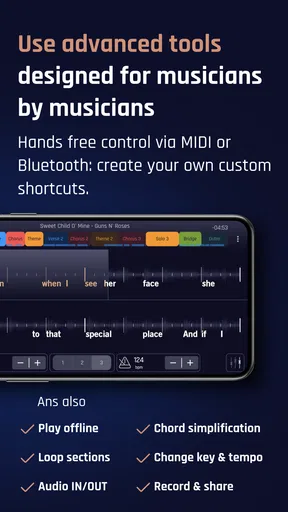
Looping is useful for more than repeating a difficult passage. I would use it to compare two attempts at the same phrase, to work on a transition into a chorus, or to give a beginner a short section they can manage before tackling a whole song. A small loop can also reduce the pressure of keeping up with an entire arrangement. The trade-off is that repetition can become tiring, so I’d take breaks and occasionally return to the full track to check whether the part still fits in context.
Pitch and tempo controls offer another way to adapt a song to the person using it. A singer can try a more comfortable key or speed, while a player can slow a passage down and gradually build confidence. These adjustments are most useful when they serve a specific goal: changing everything at once can make it harder to tell whether a passage is improving. I’d first settle on a comfortable pitch, then work on timing, and finally try the song at its usual pace.
Readability, sound and sensory comfort
The original review found the tracks clear and the app responsive while changing settings. That is helpful for practice, because a delay or muddy mix can make it difficult to judge whether you are keeping time. Headphones can make individual parts easier to hear; a speaker can work better when you are playing an instrument and need to hear both the backing and your own sound in the room. Either way, I would start at a moderate volume and adjust only after you know how the mix feels.
Audio-focused apps can be demanding for people sensitive to loud or layered sound. The option to mute instruments gives you a practical way to reduce some of that density, and tempo changes may make a fast arrangement less intense. Still, a backing track remains music, so it may not suit every sensory situation. A quieter room, headphones at a low level, or a short practice block can make a session more manageable, but anyone who needs a completely silent or highly controlled environment should choose accordingly.
For readers who rely on visual cues, the useful test is whether the song information and controls are comfortable to follow on their own device. Screen size, brightness and personal vision all affect that experience. I would try a familiar track before committing to a longer session, keeping the phone at a readable distance and checking that lyrics or chords are easy enough to follow while also handling an instrument. It is hard to sing or play confidently if you have to keep stopping to inspect the screen.
Using it in everyday situations
A realistic use is a short practice session after work: I might choose one song, mute the instrument I want to play, loop a tricky change, then restore the full arrangement for a run-through. That gives the session a clear purpose without requiring a rehearsal room or other musicians. For a singer, the same routine could mean selecting a comfortable pitch, trying a verse at a slower pace, and then singing along with the backing at normal speed.
It can also work for an informal get-together, where friends take turns singing or playing over a track. The app’s recording and sharing features, described in the published review, may help users keep or pass along a performance. I would treat that as a way to share a musical moment rather than assume it replaces a dedicated recording setup: a phone-based session is convenient, but people seeking detailed editing or studio control will likely prefer tools built specifically for production.
One small workflow tip is to decide what you want to practise before adjusting the track. If the aim is timing, keep the arrangement simple and use a repeatable passage. If the aim is singing, focus first on a comfortable pitch and the lyric flow. This avoids turning a useful practice tool into a long session of changing settings without actually playing.
Who will benefit, and where the limits show
Jamzone is best suited to people who want to participate in songs: casual singers, guitarists and other instrumentalists who like learning or practising alongside a backing arrangement. Beginners can use a short loop and a slower tempo to make a passage less intimidating; experienced players can strip out a part and test how their own playing sits in the mix. The app is less compelling for someone who only wants to stream finished music, or for a musician who needs precise notation, multitrack recording or extensive production controls.
Price is another part of the decision. The app is free to download, while in-app purchases range from $9.99 to $19.99 per item. With an average rating of 4.5 from around 1,800 ratings, and more than 100,000 installs, it has found an audience among music fans. It is rated for everyone, first released on June 6, 2018, and its current version is 3.5.2, with Android 8.0 as the minimum operating system. I would start by checking whether the songs and controls fit my own routine before spending on extra content.
One limitation is that a flexible backing track does not automatically make every song easy to learn. You still need to listen, keep time and decide what part to practise; muting an instrument can expose a gap in your own playing rather than solve it. The app is a practice companion, not a substitute for feedback from a teacher or for learning the fundamentals of an instrument. If you need structured lessons, notation-led exercises or a private rehearsal with exact equipment, another kind of music tool may serve you better.
Unleashing Your Inner Rockstar
First off, let’s talk about what Jamzone brings to the table. This app is a treasure trove for music lovers, offering a vast library of tracks across various genres. Whether you're into rock, pop, jazz, or blues, there's something here for everyone. The app allows you to isolate vocals or instruments, letting you focus on what you love best — singing, playing guitar, or whatever else tickles your musical fancy.
Getting Started
Setting up the app is a breeze. After downloading from the App Store or Google Play, you’re greeted with a clean, intuitive interface. I found it super easy to navigate, which is always a plus. You can either search for your favorite song or explore the curated playlists that Jamzone offers. The app’s design makes it simple to dive right into the music without getting bogged down by complicated menus.
Features Galore
One of the standout features of Jamzone is its ability to customize each track. You can mute or unmute any instrument, allowing you to create a unique mix that suits your style. For aspiring musicians, this is a game-changer. Imagine being able to play alongside your favorite bands, with just the right level of accompaniment. It’s like having your own band on demand!
Another nifty feature is the loop function. If you're trying to nail a particular riff or verse, you can loop it endlessly until you get it just right. It’s perfect for practice sessions or just having fun with friends. And let’s not forget the pitch and tempo controls, which let you adapt songs to your vocal range or preferred speed. This kind of flexibility is a godsend for both beginners and seasoned pros.
Sound Quality and Performance
I was pleasantly surprised by the sound quality. The tracks are clear and crisp, making for an enjoyable jam session whether you're using headphones or blasting through a speaker. The app runs smoothly without any noticeable lags, even when toggling multiple features. It’s clear that Jamzone has put a lot of effort into ensuring a seamless user experience.
Community and Collaboration
What’s music without a little collaboration? Jamzone knows that music is more fun when shared. The app allows you to record your sessions and share them with friends or the wider Jamzone community. You can also join public sessions and jam with other users worldwide. It’s a fantastic way to connect with fellow music enthusiasts and maybe even make some new friends along the way.
Is It Worth It?
So, is Jamzone - Sing & Play Along worth a download? In my opinion, absolutely. Whether you're a casual singer looking to belt out your favorite songs in the shower, or a musician seeking a versatile practice tool, this app has something for you. The combination of a vast song library, customizable tracks, and community features makes it a must-have for anyone who loves music.
Of course, it’s always nice to have a free option, and while Jamzone offers a free version, unlocking its full potential does require a subscription. But for the features and quality offered, it’s a small price to pay for hours of musical enjoyment.
In conclusion, Jamzone delivers on its promise to make singing and playing along more fun and engaging. Whether you're in it for the love of music or looking to polish your skills, this app is a rockin' companion. So go ahead, give it a try, and unleash your inner rockstar!
Verdict
Strengths of Jamzone - Sing & Play Along
- High-quality backing tracks for musicians.
- User-friendly interface with easy navigation.
- Wide range of genres and songs available.
- Customizable track settings for practice.
- Offline mode for on-the-go access.
Limitations of Jamzone - Sing & Play Along
- Limited free content without subscription.
- Requires stable internet for streaming.
- Occasional ads can interrupt experience.
- Some tracks may lack full instrumentation.
- Subscription can be pricey for casual users.
Other Releases by Recisio
View All
KaraFun: Karaoke, Battle, Quiz
Music & Audio4.6
Similar Picks in This Category
View All
YouTube Music
Google LLC4.4

Samsung Music
Samsung Electronics Co., Ltd.3.8

Spotify: Music and Podcasts
Spotify AB4.3

JioSaavn - Music & Podcasts
Saavn Media Limited4.3

Lark Player:Music Player & MP3
Lark Player Studio - Music, MP3 & Video Player4.6

StarMaker: Sing Karaoke Songs
SKYWORK AI PTE. LTD.4.3
Frequently Asked Questions
What is Jamzone and how does it work?
Jamzone is an interactive music app designed for musicians and singers who want to practice and perform with backing tracks. It offers a wide array of popular songs, allowing users to sing or play along with high-quality instrumental tracks. The app provides features like adjustable tempo and key, as well as the ability to isolate instruments, making it an excellent tool for both practice and live performances.
Is Jamzone suitable for beginners?
Yes, Jamzone is well-suited for beginners. The app features an intuitive interface that makes it easy to navigate and use. With adjustable tempo and pitch controls, beginners can slow down tracks to learn at their own pace. Additionally, the ability to isolate individual instruments helps users focus on specific parts of a song, enhancing their learning experience.
Can I use Jamzone offline?
Jamzone requires an active internet connection to access its library and download tracks. However, once tracks are downloaded, they can be accessed offline, making it convenient for users to practice or perform anywhere without relying on an internet connection. This feature is particularly useful for those who travel or have limited internet access.
What are the subscription options for Jamzone?
Jamzone offers both free and premium subscription options. The free version provides limited access to tracks and features, while the premium subscription unlocks the full library and advanced features like unlimited downloads, custom playlists, and more. Users can choose between monthly or annual plans depending on their needs and budget.
Are there any limitations on the types of songs available in Jamzone?
Jamzone boasts a diverse library of songs across various genres, including rock, pop, jazz, and more. While it offers a wide selection, the availability of specific songs depends on licensing agreements. New tracks are regularly added to the library, ensuring users have access to a constantly evolving collection of music.
